
Socialhyp
August 11, 2026
How Website Design Impacts SEO Rankings and Organic Traffic
Many organizations think that website design and SEO are separate tasks. Design accounts for how the website looks. Optimization accounts for keywords, links, and search rankings. In truth, search engines such as Google analyze your site as a whole. A beautiful site that loads slowly will lose traffic. A fast site with a bad layout will turn visitors away.
Good website design and SEO must work together. Here is how site design directly shapes your search rankings and traffic.
1. User Experience SEO and Behavior Signals
Search engines aim to give you the best results for every search. They observe how real users navigate your pages to assess quality. User experience SEO helps you to get trusted signals.
Bounce Rate and Reading Time
When someone clicks your site and leaves right away, search engines notice. This fast exit shows that your page did not help the user.
Good design keeps visitors reading by using:
- Large, clear fonts with simple spacing.
- Short paragraphs with plenty of empty space.
- High contrast colors that are easy on the eyes.
Page Views and Clicks
Clear menus and helpful buttons invite readers to explore. When visitors click through to other pages, they stay longer. Search engines view longer visits as a sign of a high-quality website.
2. Mobile-First Indexing and Responsive Design
Google primarily uses the mobile site to calculate rankings. If you only have a good table site, but your site isn't good on desktop, your ranking will drop.
Responsive Design SEO
Responsive design changes the display of your page to fit each screen size. That means you're great on phones, tablets and computers.
To create a mobile friendly site:
Use fluid layouts which can fit to any screen width.
Make sure your buttons are big enough for clicks from the thumb.
Ensure your text, images and links are identical everywhere.
Responsive design also simplifies things. You don't have to create a separate address for your mobile users.
3. Clear Website Structure and Navigation
A clean website structure acts like a map for visitors and search engine bots. If bots cannot crawl your site, your pages will not show up in search results.
Building a Simple Layout
- Simple Web Links: Use readable names with these words instead of "4 5 3 2 1" numbers.
- Internal Links: Link related pages with readable links to transfer value through your site.
- Header Menus: Put major links at the top so that people and crawlers can reach main pages quickly.
4. Technical SEO and Site Speed
Design choices change how fast your pages load. Search engines measure loading speed to grade user experience. So it is necessary to fix technical SEO parameters. Technical parameters plays a major role in website design and SEO.
Speed Metric | What It Measures | Target Score |
Loading Speed | Time to show main content | $2.5$ seconds or less |
Response Time | Speed when clicking elements | $200$ milliseconds or less |
Visual Stability | Page elements moving while loading | $0.1$ or less |
Simple Fixes for Speed
- Compress Media: Large image files slow down pages. Convert images to modern formats like WebP before uploading.
- Clean Code: Remove extra spaces and unneeded code from CSS and JavaScript files.
- Set Image Size: Always define exact height and width for images. This stops content from jumping as the page loads.
5. Building E-E-A-T and Visitor Trust Through Design
Google favors sites that show experience, expertise, authority, and trust. Your design shows trust the moment a page loads.
Visual Signals That Build Trust
- Contact Information: Put phone numbers, email addresses, and locations in your footer or header.
- Author Details: Add bio boxes with clear credentials on blog posts and articles.
- Site Security: Secure your site with HTTPS certificates. Display safety badges on form pages.
- Clean Appearance: Broken links, missing pictures, and pop-up ads make your site look unsafe. Clean layouts build confidence quickly.
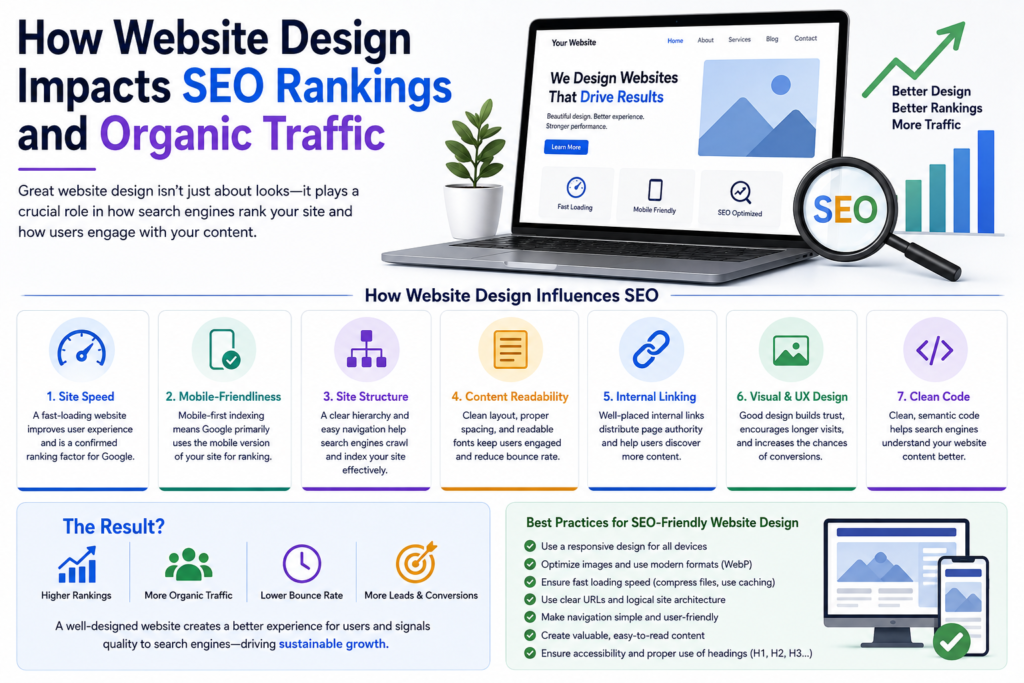
6. Making Visual Content Searchable
Search bots read text easily. They cannot view images or videos the way people do. Your website design and SEO must make visual elements easy for bots to process.
Image Text Descriptions
Add descriptive alt text to every image file. Alt text helps visually impaired readers using screen readers. It also tells search engines what your photos show.
Avoid Text Inside Images
Never save important text inside an image file. Search bots cannot read words embedded in pictures. Always write main headings and body text using standard HTML code.
Avoid Annoying Pop-ups
Full-screen pop-ups irk visitors, especially on mobile phones. Google punishes pages that hide main content behind bulging ads. Use small banner boxes instead.
Design Checklist for Better Search Rankings
Check these items to ensure your site design supports your search goals:
- Test your layout on phones, tablets, and desktop computers.
- Make sure main pages load in under three seconds.
- Keep all key pages within three clicks of the homepage.
- Add descriptive text to every image on your site.
- Display phone numbers, address details, and secure HTTPS icons clearly.
When you merge smart design with clear website optimization, your site ranks higher and turns visitors into loyal customers.
 Visit Socialhyp.com and start your digital transformation today!
Frequently Asked Questions (FAQs)
Be under two and a half seconds. Fast page speed means you won’t get bounced or spammed, and search engines demand high website performance.
Search engines index and rank your pages by using the mobile version of your site. If your site is still bad on mobile, organic traffic in all search results will be lost.
Improper images reduce your page speed and therefore harm your ranking. Use progressive image compression technologies like WebP, and use clear alternative text to explain the image to search engines.
Sure. Bad menus make finding content terrible, but worse still, they prevent crawling, which is vital for a good online presence. Use a shallow menu structure, and make sure you are crawlable.